Craiyon
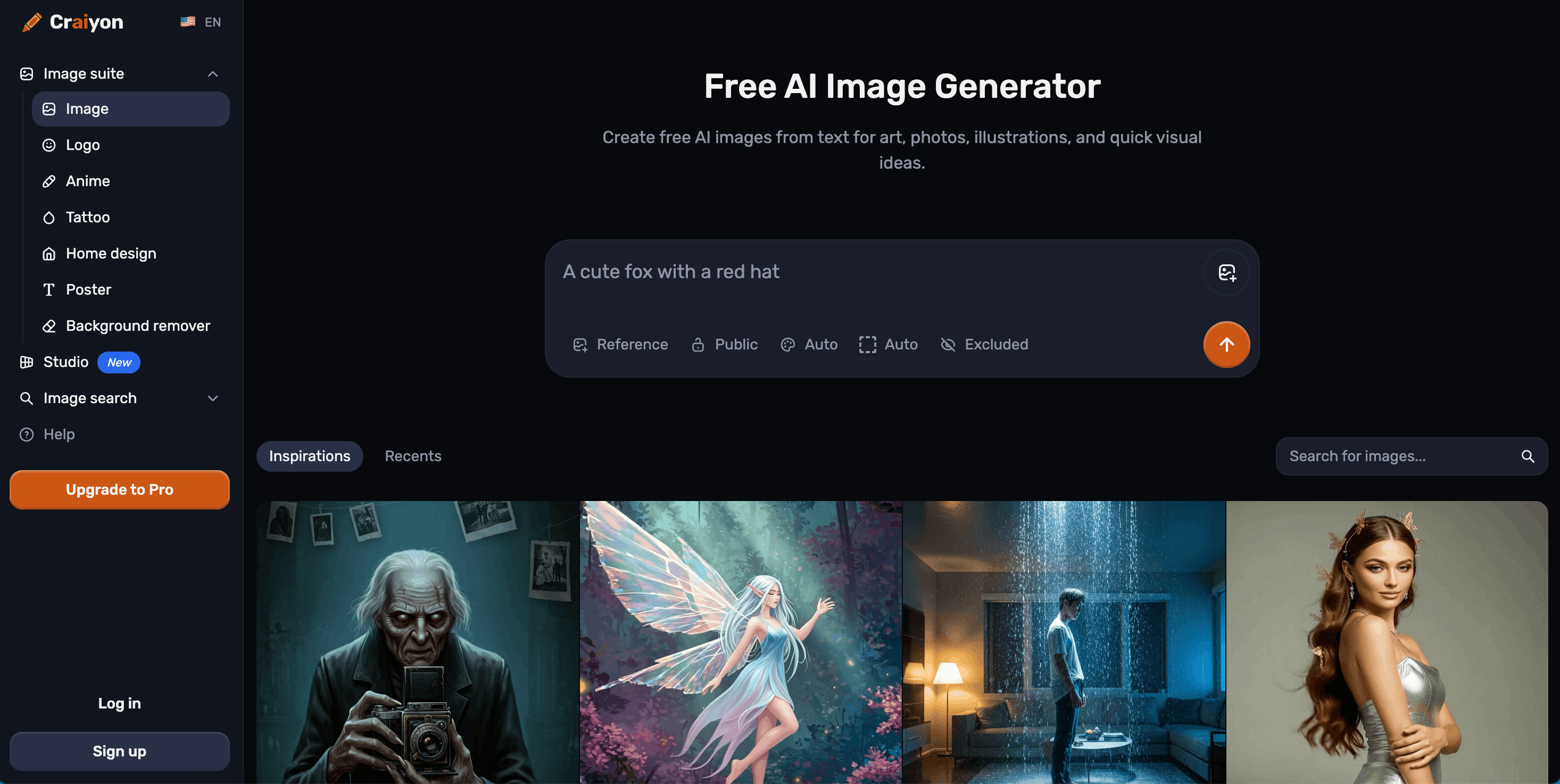
« Free AI image generator, formerly known as DALL-E mini. »
Craiyon: Free AI Image Generator, Formerly DALL-E Mini
Craiyon is a free AI image generator that turns text prompts into original images in seconds. It began life in 2021 as DALL-E mini, an open-source project built by Boris Dayma, before rebranding as Craiyon in 2022 to build its own identity while continuing on the same underlying technology.
What Is Craiyon?
Craiyon (Craiyon LLC) is a browser-based AI art generator focused on making text-to-image generation free and accessible, while also offering paid tiers for higher-quality output. Users type a prompt, choose a style, and the AI produces one or more images based on diffusion technology that starts from random noise and refines it toward the description provided.
Core Features
Six Style Presets
Generations can be produced in Artistic (digital painting and creative textures), Photo (realistic, photographic results), Anime (Japanese animation-inspired visuals), Illustration (artistic drawings and digital art styles), Vector (clean, scalable graphics with bold shapes), or Raw (pure AI interpretation without style bias).
Exclude Field
Alongside the main prompt, Craiyon offers an "Exclude" field where users can specify concepts they don't want in the image, such as "people," "text," or "blue colors," giving more precise control over results than a single prompt box.
Flexible Aspect Ratios
Craiyon automatically selects a fitting aspect ratio for a given prompt, or users can choose square, landscape, or portrait manually.
Editing With Credits
Generating an image from a text prompt doesn't require credits, but editing an image with Craiyon's highest-quality models does. Subscription plans include a monthly credit allowance that renews each billing period, with additional top-up packs available.
Image Search and Discovery
Craiyon includes a searchable library of community-generated images organized by category, and clicking any image reveals the exact prompt used to create it, making it a source of prompt inspiration as well as a generator.
Additional Generators
Beyond the core image generator, Craiyon offers dedicated tools for logos, anime art, tattoo designs, home design concepts, and posters, plus a background remover and a newer "Studio" mode.
Pricing Plans
Craiyon uses a freemium model:
Who Uses Craiyon?
Why Choose Craiyon
Craiyon's main appeal is accessibility: unlike many AI image tools that gate generation entirely behind a paywall, Craiyon's core text-to-image generation is free and always has been, with paid tiers layered on top for quality, speed, and editing rather than as a hard requirement to use the product at all. Its long history, dating back to the original DALL-E mini project, also means the community and prompt-sharing ecosystem around it is relatively mature compared to newer generators.
Frequently Asked Questions
Is Craiyon really free?
Yes. Craiyon offers free image generation to everyone, though free users have a limited number of images and reduced functionality compared to paid subscribers.
Can I use Craiyon's generated images commercially?
Yes, as long as users follow Craiyon's Terms of Use, generated images can be used for personal, academic, or commercial purposes. Free-tier users are asked to credit craiyon.com when using the images.
Is Craiyon related to DALL-E mini?
Yes. Craiyon started as DALL-E mini in 2021, built by CEO Boris Dayma and the core team, and rebranded to Craiyon in 2022 while continuing to build on the same foundation.
What's the difference between free and paid accounts?
Free users get base-quality images with watermarks and occasional wait times. Paid plans add higher-quality models, editing credits, all aspect ratios, no watermarks, priority generation, and higher-quality downloads, scaling up through Supporter, Professional, and Ultra tiers.
Do prompts need to be in English?
No. Craiyon accepts prompts in any language and generates images based on the description provided, though more descriptive prompts tend to produce better results regardless of language.
Is there a Craiyon mobile app?
Not yet. A mobile app is in development, with the company noting it is coming soon.
How to Create AI Art With Craiyon
Step 1: Type Your Idea
Be specific about the subject, setting, and mood. More descriptive prompts tend to produce noticeably better results than short, vague ones.
Step 2: Choose a Style
Select Artistic, Photo, Anime, Illustration, Vector, or Raw depending on the desired look.
Step 3: Pick an Aspect Ratio
Choose square, landscape, or portrait, or let Craiyon select automatically based on the prompt.
Step 4: Generate and Refine
Hit generate, then refine the prompt, add terms to the Exclude field to remove unwanted elements, or browse similar community images for inspiration before trying again.
Limitations to Be Aware Of
Like any AI model trained on large amounts of internet data, Craiyon's system can reflect societal biases present in that training data, which means generated images may occasionally include stereotypes or biased representations. The team notes this is an active area of ongoing research and model improvement, and encourages users to stay mindful of it when generating content, particularly for public or commercial use.
How does the AI model actually work?
Craiyon's models are trained on millions of internet images and use diffusion technology, starting from random noise and gradually refining it into a finished image guided by the text prompt provided.
Why does Craiyon sometimes say "too much traffic"?
During peak usage times, free users may occasionally experience brief wait times as the system manages demand. Craiyon says it is constantly adding server capacity to reduce this, and subscribers get priority access that largely avoids the queue.
How can I get better results from my prompts?
Craiyon recommends being specific rather than generic (for example, "golden retriever playing in autumn leaves" instead of just "dog"), adding style cues like "oil painting" or "photorealistic," using the Exclude field to remove unwanted elements, and iterating on a prompt with small tweaks rather than starting over each time.
Can I discover what other people have created?
Yes. Craiyon's Search feature lets users explore community-generated images by category, see trending creations, and click into any image to view the exact prompt that produced it, which doubles as a source of inspiration and prompt-writing examples.
How do credits work for editing?
Credits are only spent when editing an existing image with Craiyon's highest-quality models; generating a new image from a text prompt alone does not use credits. Each subscription plan includes a monthly credit allowance that resets at the start of the billing period, and additional credit packs can be purchased separately if needed.
« Free AI image generator with 16 styles, multiple top models, and built-in editing. »
Freemium« Free online tools to compress, convert, edit, and sign PDF files in one place. »
Freemium Seedance 3
« Create stunning AI videos from text or images with Seedance AI Video Generator. Transform prompts into high-quality, realistic videos in minutes—fast, easy, and creative. »
Freemium« Free online PDF tools to merge, split, compress, and convert files in seconds. »